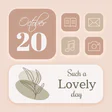
Widget 2026: Aesthetic Widgets
GeniusTools LabsPersonalization
4.61.91K Reviews
- Version
- 85.1.4
- Installs
- 10.00M
- Age Rating
- Everyone
Screenshots
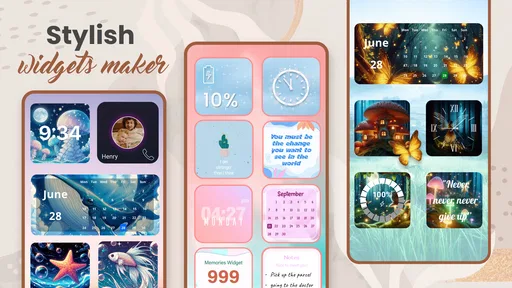
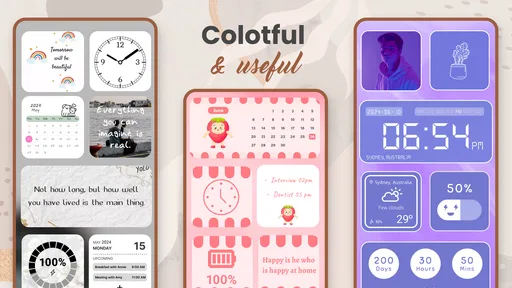
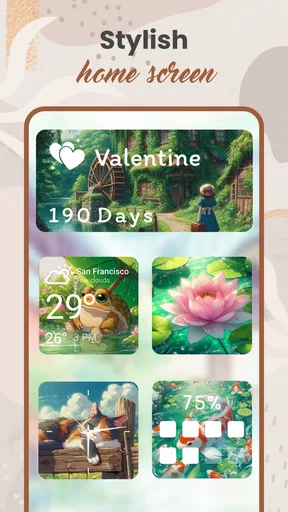
Our Review of Widget 2026: Aesthetic Widgets
 Analysis by Appyee
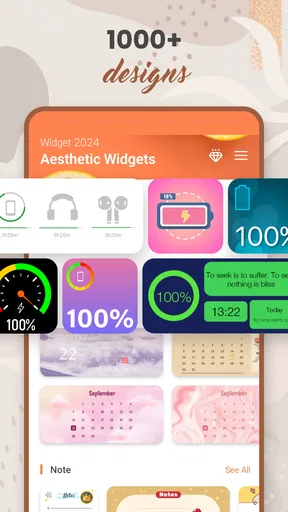
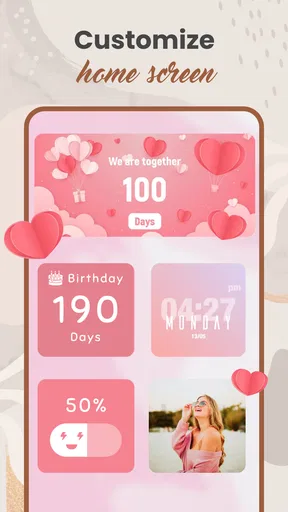
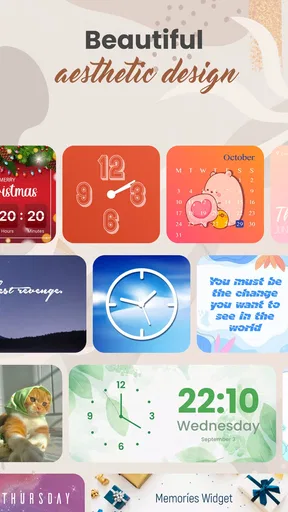
Ever found yourself gazing at your phone's home screen and thinking, "Man, this could use a little personality?" Enter Widget 2026: Aesthetic Widgets. It's like giving your phone a fresh coat of paint, but with widgets. I had the chance to dive into this app, and let me tell you, it's a game-changer for anyone looking to spruce up their digital space.
That visual focus is the clearest reason to try it. A home screen is something I see repeatedly throughout the day, so small choices in color, imagery, and layout can make the phone feel more like mine without changing how I use it. The important question is whether the creative control is useful in everyday life, not just whether a setup looks good in a screenshot. For me, the app works best when I treat appearance and quick access as one design problem.
When a visual refresh makes sense
I can picture using these widgets after changing a phone case, wallpaper, or overall theme and realizing the old home screen no longer fits. Rather than rebuilding every part of the phone, I would start with one prominent widget and choose a style that ties the screen together. A clock or calendar can act as the visual anchor; then a second, smaller element can add a personal image or a contrasting color. This keeps the result intentional instead of turning the screen into a collage.
There is also a practical use for a more personal layout: making the information I check often easier to notice. A calendar design that stands out from the wallpaper may help me spot a busy day at a glance, while an image-based widget can make a frequently used screen feel less generic. I would still keep the most important app icons easy to reach. A pretty widget is not much help if it pushes the tools I actually use into awkward places.
Build a screen around one useful element
When I customize a screen, I would begin by deciding what I want to see without opening an app. Then I would choose a widget for that purpose, settle on its colors and fonts, and only afterward add decorative touches. That order matters: it helps avoid spending time polishing a design that looks attractive but does not fit my routine. If I want a calmer screen, I would keep the palette restrained and use an uploaded image as an accent rather than letting it compete with the information.
A useful test is to live with the first version for a normal day before making more changes. If a widget is hard to read over its background, or if the layout makes me pause to find a familiar icon, I would adjust it rather than adding more elements. Customization can invite endless tinkering, but a few clear choices often make a better home screen than a crowded collection of styles.
First Impressions
When I first opened Widget 2026, the sleek and modern interface immediately caught my eye. It's intuitive, which means you don't have to be a tech wizard to navigate through it. The app welcomes you with a brief tutorial, showing how to add and customize widgets, which is super helpful if you're new to this whole widget game.
That guided start is useful because widget customization can feel unfamiliar if you have only used the standard options built into your phone. I would follow the tutorial once, then make a small first change instead of trying to redesign every screen at once. It is an easy way to learn the basic flow and see whether the app's visual approach suits you before investing time in a more elaborate setup.
First Impressions
I approach a first session as a small design experiment rather than a full home-screen makeover. The useful question is not how many styles I can try, but whether a widget can make something I check often easier to notice while still fitting the rest of my screen. Starting with that one practical goal gives the customization a clear purpose and makes it easier to decide what to keep.
Customization Galore
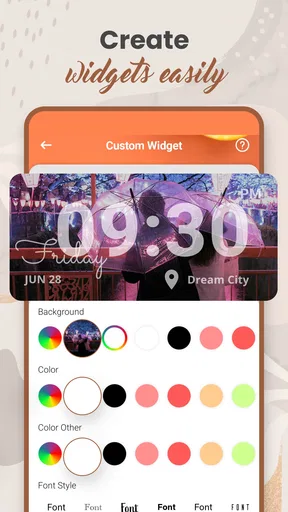
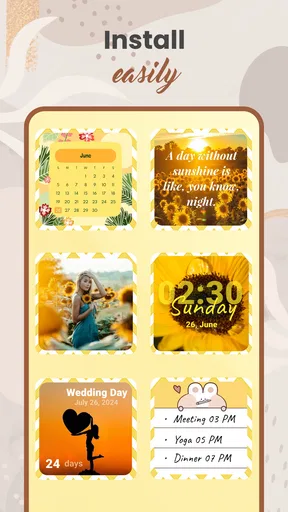
Let me just say, the customization options are off the charts. You can tweak everything from fonts to colors, making it easy to match your widgets with your phone's theme. Feeling a bit artsy? You can even upload your own images to create truly unique widgets. The creativity here is endless.
That freedom has a trade-off: the more choices I make, the easier it is to lose consistency. I would pick a small set of colors and fonts for the whole screen, then vary the images or widget sizes only where they serve a purpose. Using a personal photo can make a widget feel distinctive, but a busy image may also reduce contrast and make text harder to scan. I would choose a quieter crop or a simpler background when readability matters more than decoration.
One of my favorite features is the ability to layer widgets. You can stack a clock on top of a calendar or have a weather widget with a motivational quote right below it. This layering feature allows for a more dynamic and interactive home screen, which I found incredibly satisfying.
Layering is most helpful when it reduces visual clutter rather than merely adding more content. I would group items that make sense together, such as time and a daily schedule, and avoid stacking elements that I need to inspect at the same moment. Before settling on a layered arrangement, I would check whether the information I care about remains easy to find and whether the result leaves enough room for my everyday app shortcuts.
Performance and Usability
Performance-wise, the app runs smoothly without a hitch. Widgets load quickly and don't seem to drain the battery, which is a major plus. I've had apps in the past that were notorious for turning my phone into a hot brick, but not this one. It's optimized to ensure that you can enjoy your aesthetic widgets without worrying about lag or crashes.
For a personalization app, smoothness matters because a widget is part of the screen I return to throughout the day. Still, I would judge a setup over ordinary use rather than by how it looks immediately after I create it. Keeping the layout focused is a sensible way to avoid unnecessary visual noise, and it also makes it easier to tell whether the widgets I chose are genuinely useful. If a design looks lovely but I keep opening the same apps manually, I would simplify it.
Usability is another strong suit. The app supports both Android and iOS, and the experience is seamless across devices. Whether you're rocking the latest iPhone or a trusty Android, Widget 2026 has got you covered.
For Android users, the app is listed as a free personalization download, with in-app purchases ranging from $0.99 to $99.99 per item. It is rated for Everyone, and the listed minimum Android requirement is version 5.0. Those details make it easier to decide whether to try it, but I would still check that the specific device I plan to use meets the requirement before building a setup around it. The current version is 85.1.4.
Widget 2026: Aesthetic Widgets is from GeniusTools Labs. It has an average rating of 4.6 from around 166,000 ratings, and more than 10 million installs. It was released on July 19, 2022, and has about 1,700 written reviews. That level of adoption suggests plenty of people have tried it, though popularity alone cannot tell me whether a particular design style or workflow will suit my own phone.
Community and Inspiration
One of the coolest aspects of Widget 2026 is its community-driven approach. There's a whole section dedicated to user-created widgets, where you can browse, download, and even share your creations. It's like having a Pinterest board for widgets. I spent hours just exploring and getting inspiration from other users.
Browsing other designs can be more useful as a source of ideas than as a reason to copy a complete layout. I would look for one detail I can adapt, such as a restrained color combination or a way of placing an image, then make the rest fit my own habits. That approach saves time while helping the final screen feel personal rather than borrowed. If I do not want to spend time browsing, I can simply start with my own wallpaper and build around the colors already on the phone.
There's also a nifty feature that lets you follow your favorite creators, so you'll always be up-to-date with the latest widget trends and designs. It's a fantastic way to keep your home screen fresh and exciting.
Following creators is most valuable to someone who enjoys refreshing their look often. If I prefer a stable setup, I would treat new designs as occasional inspiration rather than a prompt to keep changing everything. Constantly replacing a layout can make familiar shortcuts harder to find, so I would keep a dependable everyday arrangement and experiment on a secondary screen if I want to try a more adventurous style.
Integration Features
The app integrates with a bunch of other apps like calendars, weather services, and even music players. This means your widgets are not just pretty faces, they actually serve a purpose. I found the calendar widget particularly useful, as it syncs with my events and reminders, keeping me on track throughout the day.
A realistic routine where this can pay off is a busy morning: I can glance at the calendar while getting ready, then check the rest of the home screen for the next thing I need, instead of opening several apps just to orient myself. I would put the calendar where it is easy to see and keep decorative elements secondary. For someone who relies on a packed schedule, a standard calendar app may still be the better choice for editing and managing events; a widget is best treated as a quick view, not a replacement for the full calendar workflow.
The music widget is also a nice touch. It lets you control your tunes right from your home screen without having to open your music app. It's small conveniences like these that really make Widget 2026 stand out.
These integrations are a reason to choose a widget approach over a purely decorative wallpaper, but the balance depends on what I want from my phone. If I mainly want a quick visual refresh, changing the wallpaper or using built-in home-screen tools may be enough and involve less setup. If I want to shape the look of the screen while keeping items such as a calendar or music controls visible, this app's combination of customization and practical widgets makes more sense.
Where it may not be the right fit
I would skip this app if I am satisfied with the default widgets on my phone, have little interest in visual customization, or want a home screen that never needs attention. It is also not the best match for someone who values the simplest possible setup over choosing fonts, colors, and images. The creative options are the appeal, but they can become a distraction if I would rather spend no time adjusting how the phone looks.
It is worth separating the app's role from the phone's own home-screen tools. Built-in options are often the straightforward choice for someone who only wants basic information in a familiar format. A dedicated aesthetic widget app is more appealing when the design itself matters and I want to coordinate the screen more closely. I would try one useful widget first, then decide whether the extra creative control earns a permanent place in my routine.
Final Thoughts
All in all, Widget 2026: Aesthetic Widgets is a fantastic app for anyone looking to add a personal touch to their phone's home screen. It's easy to use, packed with features, and backed by a vibrant community. Whether you're a customization newbie or a seasoned pro, this app is sure to keep your home screen looking sharp and functional.
My recommendation is strongest for people who enjoy making their phone feel personal and want visual choices to do more than decorate. The best results come from starting with one job—seeing a schedule, checking a detail, or reaching music controls—then shaping the design around it. If I only want a simple screen and have no appetite for tweaking it, the standard tools already on my phone may be a better fit.
If you're ready to transform your phone into a canvas of creativity, give Widget 2026 a try. Trust me, your home screen will thank you.
Verdict
Strengths of Widget 2026: Aesthetic Widgets
- Highly customizable widget designs.
- User-friendly interface for easy setup.
- Regular updates with new features.
- Compatible with most device themes.
- Low impact on device battery life.
Limitations of Widget 2026: Aesthetic Widgets
- Limited free customization options.
- Occasional bugs in widget display.
- Requires in-app purchases for full access.
- Some features need internet connection.
- Ads can be intrusive in free version.
Other Releases by GeniusTools Labs
View All
Trace Drawing: How To Draw
Art & Design4.6

GPS Maps Voice Navigation App
Maps & Navigation4.8

Sweet Editor Camera Lite
Beauty4.6

Who Is Tracking My Phone?
Tools3.9
Similar Picks in This Category
View All
Microsoft SwiftKey AI Keyboard
SwiftKey4.3

Wallpapers
Google LLC4.1

Zedge™ Wallpapers & Ringtones
Zedge4.7

Yandex Browser with Alice AI
Direct Cursus Computer Systems Trading LLC4.3

Ringtone Maker:create ringtone
Big Bang Inc.4.7

Fonts Keyboard
Fonts Keyboard3.9
Frequently Asked Questions
What is Widget 2026: Aesthetic Widgets?
Widget 2026: Aesthetic Widgets is a customization app that allows users to personalize their smartphone home screens with a variety of aesthetically pleasing widgets. It offers a range of styles, themes, and colors designed to enhance the visual appeal and functionality of your device's interface.
How user-friendly is Widget 2026 for beginners?
Widget 2026 is designed with user-friendliness in mind, featuring an intuitive interface that allows even beginners to easily navigate and customize their widgets. The app includes guided tutorials and tips, ensuring that users can make the most of its features without a steep learning curve.
What customization options are available in Widget 2026?
Widget 2026 offers extensive customization options, including various widget sizes, styles, and color schemes. Users can choose from pre-designed themes or create their own, allowing for a fully personalized home screen experience. The app also supports integration with calendars, weather, and other functionalities.
Is Widget 2026 compatible with both Android and iOS devices?
Yes, Widget 2026 is available for both Android and iOS devices. The app is optimized to run smoothly on both platforms, ensuring a seamless user experience regardless of the operating system. Users can download the app from Google Play Store or Apple App Store.
Are there any costs associated with using Widget 2026?
Widget 2026 is free to download and use, offering a selection of basic widgets at no cost. However, there are in-app purchases available for users who wish to access premium features, additional themes, and advanced customization options, providing a broader scope for personalization.
